

Introduction:
Running a busy chiropractic practice involves a constant balancing act. Between managing patient appointments, handling complex billing codes, and ensuring detailed clinical documentation, many clinics feel the strain of administrative burnout. This is where specialized practice management tools come into play.
Modern clinics are moving away from manual filing and fragmented systems. They need unified platforms to handle the heavy lifting of healthcare administration. In this guide, we explore Genesis chiropractic software to help you understand how it fits into a modern clinical environment, what it offers, and whether it’s the right fit for your practice goals.
What is Genesis Chiropractic Software?
Genesis chiropractic software is a cloud-based Electronic Health Record (EHR) and practice management system specifically designed to streamline the operations of a chiropractic office. It centralizes clinical notes, automated billing, appointment scheduling, and patient communications into one digital platform. The primary goal of this tool is to reduce administrative time so providers can spend more time on patient care.
TL;DR: The Quick Breakdown
- Core Focus: Automating billing, clinical documentation (SOAP notes), and patient scheduling.
- Best For: Practices looking to reduce claim denials and improve front-desk efficiency.
- Accessibility: Cloud-based, meaning you can access it from any device with an internet connection.
- Key Advantage: Robust compliance features and billing automation specifically tailored for chiropractic workflows.

Why Workflow Efficiency Matters in Chiropractic Care
In a typical US-based chiropractic clinic, the sheer volume of paperwork can be overwhelming. From tracking insurance authorization to managing X-ray uploads, the administrative burden is often cited as a leading cause of physician burnout.
When you implement a dedicated solution like Genesis chiropractic software, you are not just buying a piece of technology; you are investing in a system designed to handle the nuances of musculoskeletal documentation.
1. Mastering Clinical Documentation
One of the biggest hurdles for any chiropractor is the speed and accuracy of SOAP notes. If your notes are incomplete or generic, you risk audit failures and insurance claim denials. This software focuses on templating that allows for rapid, customized documentation. By using pre-built macros and intuitive interfaces, providers can create compliant, descriptive notes in minutes rather than hours.
2. Billing and Revenue Cycle Management (RCM)
Billing is the lifeblood of your practice. Managing claims manually is prone to human error, leading to delayed payments. Genesis chiropractic software integrates billing directly with clinical notes. As you document the visit, the system can assist in coding and claim submission. This creates a tight loop between the treatment provided and the reimbursement received, which is vital for maintaining healthy cash flow.
3. Patient Engagement and Retention
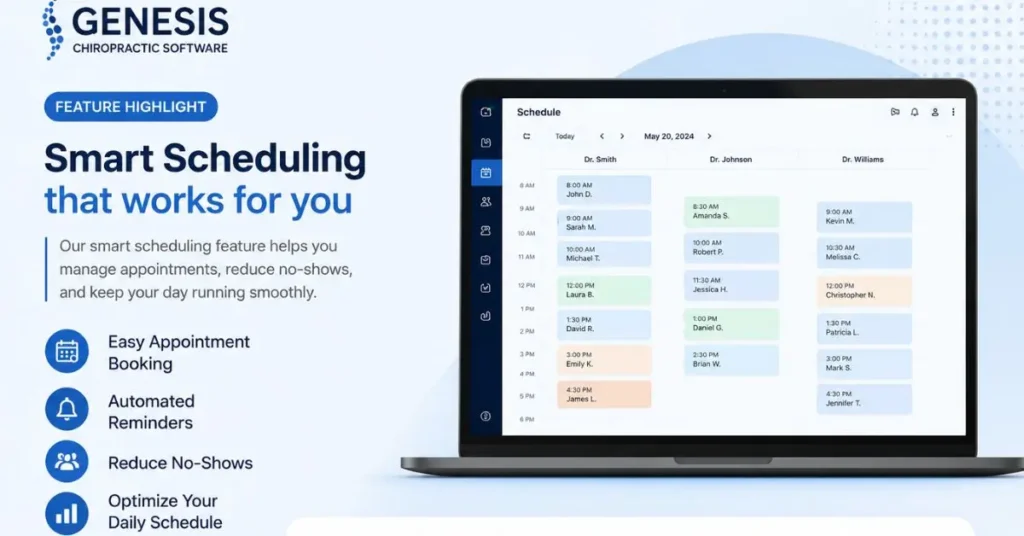
A modern practice relies on communication. Automated appointment reminders, text messaging, and patient portals are no longer “nice-to-have” features—they are expectations. When patients can self-schedule or receive automated reminders, no-show rates typically drop significantly. The software handles these touches automatically, keeping your schedule full and your patients informed.
Evaluating Features: What Matters Most?
When looking at any EHR system, it is easy to get distracted by flashy features. However, the true value lies in how the software handles your specific clinic needs.
| Feature Area | Why It Is Critical | Impact on Clinic |
|---|---|---|
| SOAP Notes | Legal compliance and audit protection | Drastically reduces documentation time |
| Billing/Claims | Ensuring timely reimbursement | Minimizes claim denials and rejections |
| Scheduling | Managing patient throughput | Reduces administrative phone time |
| Reporting | Understanding clinic performance | Data-driven decision making |
Implementing New Software: A Practical Approach
Moving to a new platform is rarely simple. It is a major transition that requires planning. If you are considering Genesis chiropractic software, here is how to approach the transition successfully.
Audit Your Current Workflow
Before signing a contract, map out your current processes. Where are the bottlenecks? Are you losing time on phone calls? Are your billing claims constantly being kicked back? Identify the top three pain points in your current system. If the new software doesn’t solve at least two of these, it might not be the right move.
Staff Training
The biggest failure point in any software rollout is lack of training. Your front desk, billing team, and clinical staff all need to be on board. Ensure that the vendor provides comprehensive training resources. You cannot expect a seamless transition if your team is guessing how to input patient data.
Data Migration
Moving years of patient records is delicate. Ensure the vendor has a clear roadmap for migrating your historical data. Ask specific questions: Will my old SOAP notes be readable? Will patient history transfer accurately? A smooth migration is worth its weight in gold.
The Importance of Compliance
In the US, HIPAA compliance is non-negotiable. Any software handling Protected Health Information (PHI) must be secure, encrypted, and backed up. One of the strongest arguments for using cloud-based Genesis chiropractic software is the security infrastructure.
Because the system lives in the cloud, you don’t have to worry about physical server maintenance or local backups that could be lost in a hardware failure. Professional data centers manage these backups, often providing a level of security that a small private practice could never afford to implement on its own.
Common Challenges and How to Manage Them
Even the best software has a learning curve. Here are a few realities to keep in mind when using Genesis chiropractic software or any similar practice management suite.
The “All-in-One” Trap
Sometimes, specialized tools (like a dedicated billing service or a standalone patient engagement app) are better than the “all-in-one” feature set of a major EHR. Be honest about what you need. If the integrated billing module doesn’t meet your expectations, consider whether you are willing to use a third-party add-on or if you need a different software entirely.
Customization vs. Standardization
Systems that are highly customizable can be overwhelming to set up. You might spend weeks tweaking settings before you even see a patient. Look for a balance—a system that works “out of the box” but allows for enough customization to reflect your specific treatment style.
Frequently Asked Questions
Is Genesis chiropractic software cloud-based?
Yes, it is a cloud-based solution. This allows users to access clinical notes, billing data, and patient schedules from anywhere with an internet connection, which is essential for modern, flexible practice environments. It also means you do not need to maintain expensive servers in your office.
Does it help with insurance claim denials?
Yes, it is designed to help reduce claim denials by streamlining the documentation process. Because the system links clinical notes directly to billing, it ensures that your claims are coded correctly based on the treatment provided, which is a major factor in getting claims approved on the first submission.
Is it difficult to learn for older staff members?
Like any complex software, there is a learning curve. However, the system is designed with specific workflows in mind to reduce the number of clicks required for common tasks. Success depends largely on the training and onboarding resources provided by the vendor during the initial implementation phase.
Can I export my data if I decide to switch software later?
Most reputable EHR providers have protocols for data export. However, always verify this contractually before you sign. Ensure you understand exactly what data format you would receive if you ever chose to leave the platform, as ownership of your patient records is a critical legal requirement.
Final Thoughts
Choosing the right technology for your clinic is a long-term decision. You want a system that scales with your practice, supports your billing needs, and protects your data. When considering Genesis chiropractic software, look beyond the sales pitch. Ask for a demo that mirrors your actual daily workflow, speak to other chiropractors who have used the system for more than a year, and ensure the support team is responsive.
Technology should serve your clinic, not the other way around. By focusing on how the software integrates with your specific needs, you can make an informed decision that saves time, increases revenue, and allows you to focus on what matters most: your patients.